
UNC Health
UNC Health CareMedical
4.388.00 Reviews
- Version
- 3.11.0
- Installs
- 100.00K
- Age Rating
- Everyone
Screenshots
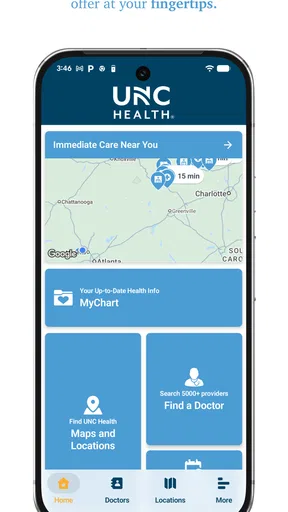
Our Review of UNC Health
 Analysis by Appyee
When I need to deal with a health-system task, the hardest part is often not the medical question itself. It is finding the right building, arranging the right appointment, or deciding whether an urgent concern needs attention now. UNC Health is designed around those practical moments. Developed by UNC Health Care, this free medical app brings wayfinding, scheduling, and virtual urgent care into one place rather than making me jump between separate tools.
My overall impression is that it works best as a companion to an existing UNC Health relationship. It is not a replacement for a doctor, a full medical reference library, or emergency services. Instead, it tries to shorten the path between “I need help” and “I know what to do next.” That focus makes it more useful than a broad health app when the care I need is connected to UNC Health.
The app is available for Everyone, and its current version is 3.11.0. It has built a modest but meaningful audience, with over one hundred thousand installs and an average rating of 4.3 from around three hundred ratings. Those figures suggest a generally positive reception, although the experience will naturally depend on which UNC Health service I am trying to reach and how well my phone handles the app.
From a health concern to the right next step
I find it helpful to begin with the problem I need to solve, rather than opening a health app and hoping it will point me somewhere useful. In this section, I look at how UNC Health can connect a concern with a practical next step, while keeping in mind that the right route depends on urgency and the kind of care needed. That distinction sets up a closer look at how quickly the app can help me get oriented.
Starting with the situation I actually have
A realistic use case begins with a small but stressful problem: I have an appointment at a UNC Health location, but I am not familiar with the campus. I may also need to arrange care, check whether virtual urgent care is appropriate, or find a way to contact the right part of the health system. In that situation, opening one app is more convenient than searching the web, calling a general number, and then trying to remember directions.
The most useful mindset is to treat UNC Health as a navigation tool for care, not as a general wellness app. I would open it with a specific task in mind: locate a facility, look for scheduling options, or investigate virtual urgent care. That makes the experience more focused. If I only want medication reminders, exercise tracking, symptom journaling, or health education, this is not the app I would choose.
That distinction matters because the app’s value comes from connecting me to UNC Health’s own services. The closer my need is to that network, the more likely the app will save time. If I live far from the system, use another provider, or need independent medical advice, a general healthcare portal or direct contact with my clinician may be a better fit.
Finding a facility without turning the visit into a scavenger hunt
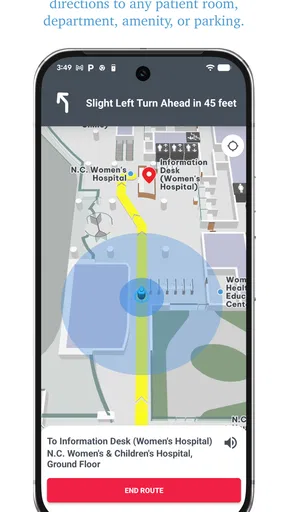
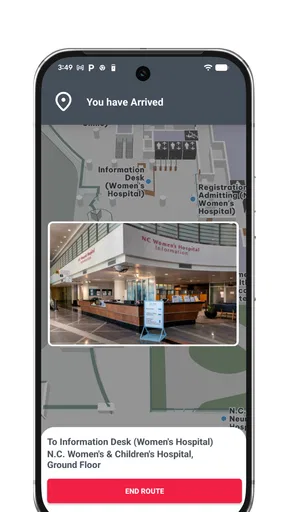
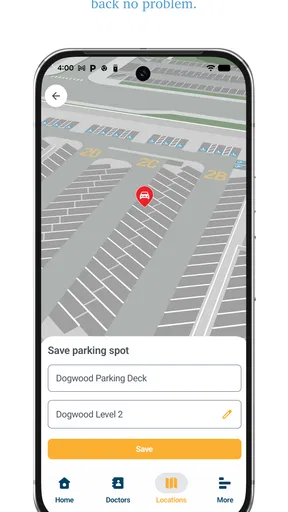
Wayfinding is one of the most practical parts of the experience. A hospital visit can involve more than simply reaching the correct street address. Large medical campuses may have several entrances, departments, parking areas, and buildings, and a first-time visitor may not know which destination matters for the appointment. Having location help tied to the health system is more useful than relying only on a generic map.
I would use this feature before leaving home, not only after arriving. Checking the destination early gives me a chance to notice whether I am heading to a hospital, clinic, or another UNC Health site. It also helps me avoid the common mistake of assuming that every appointment connected with the same health system takes place in the same building.
A useful habit is to keep the appointment details nearby while using the wayfinding tools. The app can help with the location side of the problem, but I still need to verify the department and appointment time from the information I received. That handoff between the app and my appointment confirmation is important: navigation can get me close, while the appointment details tell me exactly where I am expected.
Moving from location to scheduling
Scheduling is more valuable when it is connected to the place and type of care I need. Instead of treating an appointment as an isolated calendar entry, UNC Health gives me a route from the health-system service to the next administrative step. For someone already trying to use UNC Health, that can reduce the need to search through multiple pages or make several calls.
I would still pay close attention to the appointment details before confirming anything. The convenient part of digital scheduling is speed, but speed can encourage mistakes. I would check the provider or service, location, date, and whether the visit is in person or virtual. If any of those details look unclear, contacting the relevant office is safer than assuming the app has interpreted my need correctly.
This is also where the app’s limits become visible. Scheduling can organize access, but it cannot decide what kind of care is clinically appropriate for me. If I am unsure whether I need primary care, a specialist, urgent care, or emergency treatment, the app should not be treated as a diagnostic decision-maker. I would use it to carry out a decision, not to replace professional triage.
Using virtual urgent care thoughtfully
Virtual urgent care is the feature most likely to change the workflow for a minor, time-sensitive issue. It can be appealing when traveling to a facility would be inconvenient or when the problem seems suitable for a remote consultation. In my view, the important benefit is not simply avoiding a waiting room; it is having a UNC Health route for beginning that interaction from the phone.
There is a practical trade-off. A virtual visit may be convenient, but it cannot provide every kind of examination, test, or treatment that an in-person visit can. I would consider it for a concern that appears appropriate for remote discussion, while recognizing that the clinician may still direct me to an in-person location. That possible handoff is not a failure of the app. It is a normal boundary of virtual care.
For severe symptoms or a situation that feels immediately dangerous, I would not spend time working through an app. UNC Health is a care-access tool, not an emergency response service. In that kind of situation, emergency help is the appropriate route. The app is most sensible when I have enough time to choose between scheduling, virtual urgent care, and a regular facility visit.
The handoffs between phone, patient, and care team
The strongest part of the workflow is the way it can connect several stages that are usually scattered: deciding where to go, arranging care, and beginning a virtual urgent-care process. The weak point is that the app cannot remove every handoff. I may still need to move from the app to a clinician, from virtual care to an in-person facility, or from scheduling to a department’s own instructions.
That means I would treat every confirmation screen or appointment detail as something to save and review. A screenshot, calendar entry, or written note can prevent confusion later, especially if I am arranging care for a family member. The app may start the process, but the final responsibility for arriving at the right place and time remains with me.
For caregivers, this distinction is especially important. I would not assume that a single login or device automatically makes it simple to manage another person’s care. Before relying on the app for a family member, I would check whose appointment is being scheduled and whose information is displayed. Mixing patient details is a much bigger problem than spending an extra minute verifying them.
What the completed workflow feels like
When everything lines up, the outcome is straightforward: I identify the UNC Health location or service, arrange the next step, and arrive with a clearer idea of what happens next. The app earns its place on my phone by reducing administrative friction rather than by offering a huge collection of unrelated health tools.
I particularly like the possibility of using it before a visit instead of waiting until I am already stressed in a parking area or hospital lobby. Planning ahead gives the wayfinding feature more value and leaves me less dependent on last-minute searching. For virtual urgent care, the result is similarly practical: I can begin with a digital route before deciding whether an in-person handoff is needed.
The app is also free, which removes a barrier to trying it. That does not mean every service reached through it is automatically free; the app itself should not be confused with the cost of medical care. I would still check the normal coverage or billing details connected with the service I select. The free download is convenient, but it is not a promise about treatment costs.
Where the flow breaks down
The first likely break occurs when I do not have a clear UNC Health destination or service in mind. A general search engine may be faster for broad medical research, while a direct call may be better when I need to explain a complicated situation. UNC Health is most effective after I have identified the health system as the place I want to use.
The second break is clinical uncertainty. Scheduling tools can help me request care, but they cannot provide the nuanced judgment of a clinician. Virtual urgent care can also lead to an in-person recommendation, which means the supposedly simple digital route may become a two-step process. I would see that as a useful starting point, not a guaranteed end-to-end solution.
There is also the ordinary friction of mobile healthcare. A small screen is not ideal for reviewing detailed appointment information, and a poor connection or an outdated phone can make any app-based process less comfortable. The minimum operating system is Android 10, so users on older devices may need to check compatibility before depending on it. Keeping a backup of the appointment information is sensible whenever timing matters.
Another limitation is scope. This is not where I would look for a complete personal health dashboard, detailed self-care coaching, or a broad comparison of healthcare providers. Its role is narrower and, in the right context, more useful: it helps me interact with UNC Health services. Choosing it because I expect an all-purpose health companion would likely lead to disappointment.
How it compares with the usual alternatives
Compared with a standard map application, UNC Health has a more relevant healthcare context. A general map may be excellent for driving directions, but it does not necessarily understand the difference between a hospital entrance, a clinic department, and an appointment workflow. For a UNC Health visit, the dedicated app has the advantage of keeping location help alongside care-access tools.
Compared with calling a clinic, the app can be quicker for people who prefer to handle routine steps independently. Calling remains better when I need to describe an unusual situation, ask a question that does not fit a menu, or resolve an account or appointment problem. I would not view the app and phone support as competitors; they cover different kinds of friction.
Compared with a general telehealth platform, the virtual urgent-care option is more appealing when I specifically want to remain within the UNC Health system. A general platform may be more suitable for someone without an existing connection to UNC Health or someone comparing several care networks. The dedicated route makes more sense when continuity with the same health system matters.
Who should use it and who should skip it
I would recommend UNC Health to patients who already use UNC Health facilities, people preparing for an appointment at an unfamiliar location, and anyone who wants a direct digital route to scheduling or virtual urgent care. It is also worth considering for occasional use: I do not need to open it every day for it to be useful when a visit suddenly becomes necessary.
I would be more cautious about recommending it to someone who wants a broad medical encyclopedia, personal fitness tools, or a provider-neutral health organizer. It is also not the right first choice for emergencies or for symptoms that require immediate physical evaluation. In those cases, the convenience of an app should never delay appropriate care.
My practical advice is to install it before the day of an appointment, explore the location and scheduling paths calmly, and keep the resulting details accessible. If I am considering virtual urgent care, I would first decide whether the problem seems suitable for a remote conversation and remain prepared for a clinician to recommend an in-person visit.
My final take after following the workflow
UNC Health succeeds because it concentrates on the unglamorous parts of healthcare that often cause the most frustration: finding the correct place, arranging an appointment, and reaching urgent care without unnecessary searching. The experience is not designed to solve every medical problem, and it should not be judged as though it were a full health-management platform.
In my experience, its usefulness depends on context. For a UNC Health patient, the combination of wayfinding, scheduling, and virtual urgent care can make a stressful task feel more organized. For someone outside that system, the benefits are less compelling, and a general healthcare or mapping alternative may be more practical.
The best reason to use it is simple: it brings several UNC Health access steps into one patient-focused workflow. The main caution is equally simple: it can guide and connect me, but it cannot replace clinical judgment, emergency services, or careful verification of appointment details. With those expectations, this free medical app is a sensible tool for navigating care through UNC Health Care.
Verdict
Strengths of UNC Health
- Easy access to UNC Health appointments and provider information.
- Secure messaging helps patients communicate with their care team.
- Prescription details and refill requests are convenient to manage.
- Health records can be reviewed without calling the clinic.
- Useful location tools help find nearby UNC Health facilities.
Limitations of UNC Health
- Some features may require an active UNC Health patient account.
- Appointment availability depends on the selected clinic and provider.
- The app may request access to sensitive health information.
- Certain functions can be difficult to find for first-time users.
- Performance and notifications may vary across devices and networks.
Similar Picks in This Category
View All
WebMD: Symptom Checker
WebMD, LLC4.1

Microphone Amplifier
DOSA Apps4.2

Anatomy Learning - 3D Anatomy
3D Medical OU4.5

Period Tracker and Calendar
SimpleInnovation4.9

GoodRx: Prescription Coupons
GoodRx4.8

CVS Health
CVS Pharmacy4.5
Frequently Asked Questions
What is UNC Health, and what can I do with the app?
UNC Health is a healthcare app designed to help patients manage many everyday healthcare tasks from a mobile device. Depending on your location, account, and participating UNC Health services, you may be able to view medical information, schedule or manage appointments, communicate with care teams, review test results, request prescription refills, and access billing or insurance details. Available features can vary by patient and facility.
Do I need a UNC Health account to use the application?
Most personal healthcare features require you to sign in with a UNC Health or MyChart account. During registration, you may need to provide identifying information and verify your identity for security purposes. If you already use UNC Health’s online patient portal, your existing credentials may work. Users without an eligible UNC Health relationship may have limited access to general information or may be unable to use patient-management tools.
Can I schedule appointments and communicate with my doctor through UNC Health?
The app may allow eligible patients to schedule, reschedule, or cancel certain appointments, although availability depends on the specialty, provider, location, and appointment type. Secure messaging can also be available for non-emergency questions to participating care teams. Responses are not necessarily immediate, so the messaging feature should not be used for urgent symptoms, emergencies, or situations requiring rapid medical attention.
Can I view test results, prescriptions, and medical records in the app?
Eligible users may be able to review portions of their medical record, including laboratory results, visit summaries, medications, allergies, immunizations, and clinical notes. Some results may appear only after they are released by the care team, and certain information can be delayed or restricted. Prescription refill requests and medication details may also depend on the pharmacy, provider, and UNC Health service involved.
Is UNC Health safe to use, and what should I know about privacy?
UNC Health is intended to provide secure access to personal healthcare information, but users should still protect their account carefully. Use a strong, unique password, enable available device security such as a passcode or biometric lock, and avoid signing in on shared or public devices. Keep the app updated and contact official UNC Health support if you notice suspicious activity or an unexpected account change.
